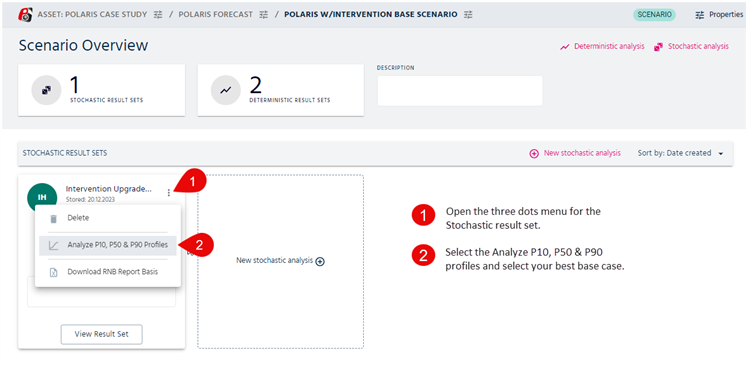
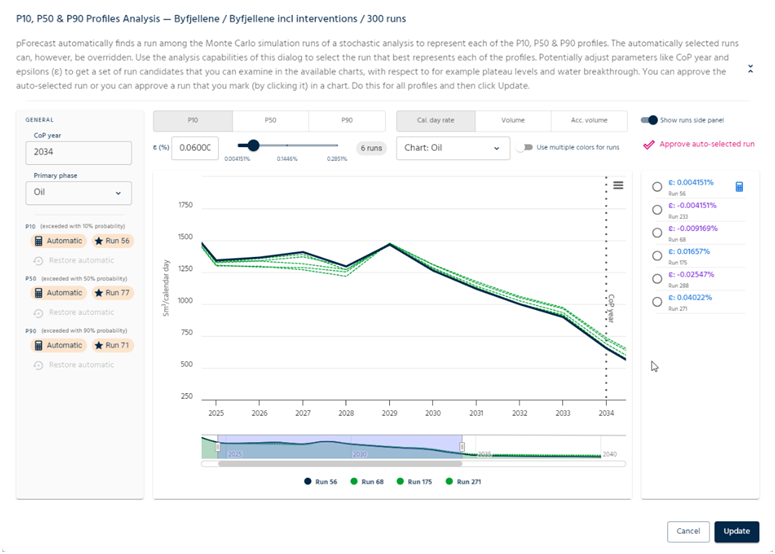
You will see the effect of that by looking at the individual percentiles, see figure 1 below to find this report. pForecast will show the automatic selected scenarios for the main percentiles, but you may select another run you think represents better a certain percentile, see figure 2.
If you have a report that is only being affected by this distribution, or zero production, then you will easily see the shape of your distribution. In the regular simulation scenarios, you will only see the P10 and P90 percentiles, but when you export your results, you will be able to see the 5th, 25th 75th and 95th percentiles.
Then you can also easily see that your distribution is correct.
Was this article helpful?
That’s Great!
Thank you for your feedback
Sorry! We couldn't be helpful
Thank you for your feedback
Feedback sent
We appreciate your effort and will try to fix the article